Wednesday, 28 September 2011

Research for Music video- good music video

A good music video
Many good music videos have been produced through out the years. Even the most simple ones which just have the artist/s singing to the camera come through as very appealing to the public eye. I've chosen to analyse Beyonce's 'Best thing I never had' music video. This video is so simple but yet very effective.


This video does not have any 'fancy' stuff like special effects but the simple acting,editing and camera movement makes this video very effective.
Here are some of the things I believe makes this video good:

  • The mise en scene is very good. The outfits are all relevant to the mood of the song. There is also a motif of the colour white e.g white room, white outfits  and white props. This shows the connotations of the lyrics she's singing "the best thing I never had" which seems to be her lover.
  • The editing was always done to the beat which makes the video run smoothly, the use of slow motions are also effective as they too go with the song.
  • The camera movement followed the pace of the song and there were a variety of angles which is also something that makes this video effective.
After seeing this video, I would like to consider doing something simple for my music video as I think that if we edit well and film well then the video would look very good. I can see that its not entirely necessary to do a lot of 'fancy' stuff in order to make a successful music video simple acting and editing will make a music video quite memorable.

Research for Music video- good music video

Research for Music video- Function of a music video

The function of a music video
 On the first lesson we were introduced to the functions of a music video. This was new to me as I had never learned about this topic. We were also introduced to the purpose of music videos.

What makes a music video a music video?
  • The music/track
  • Some genres have 'sexy' girls
  • Lip synching
  • Lighting
  • Types of cuts- 'Non linear editing'
  • Slow motion transitions
  • Outfits change a lot- unlike a film
  • Some genres are just about 'bling'
  • Repetition of images
  • Dance and performances
  • 'Sexyness'
  • Verse/chorus structure
  • Edit to the beat
Functions and purpose of Music videos
  • Sell the song- promotion
  • Makes song memorable
  • Promoting films and brands
  • Promotes/establishes the artist image- Eg: Riahnna
  • Establishes genre
  • Visual links across promo material 

Research for Music video- Copyright clearance

Copyright Clearance

We wrote to Jessie J's record label to ask for copy right clearance here is a screen shot of this:

click to enlarge


Analysis of a music video

Beyonce - Best thing I never had

I am going to analyse Beyonce  - Best thing I never had, because i think it is the perfect music video. Things I like about this video are:
  • The story in the music video really represents the song lyrics
  • The video is memorable
  • The mise en scene is perfect, the dress, makeup, lighting, setting etc. Perfect
  • The editing is good and to the beat. e.g slow motion

RESEARCH - Carol Vernallis

In Carol Vernallis' study of camerawork and editing in music videos, she found that many edits fall under the 'disjuncture' category, so there is a small connection between the edits and the song/video.  She also found that editing in music videos are more frequent than in films, and this is probably due to music videos being shorter.  Edits tend to fit well with the rhythm of the song, and no matter how wacky or crazy they may be, it gives the video the finishing touch needed to please the viewers.

Kanye West - Good Life (special effects/editing used)
Vernallis' main points that were concluded :

• Editing such as special effects and wipes can be very noticeable to draw attention to the artist themselves

• Jumps cuts are used frequently
•  The basic rules of continuity are not followed to get the viewer(s) full attention
•  A master shot (base track) is often used to structure the video
•  Camera movement may be in time with song

Examples I've found demonstrating some of her ideas:

MZ BRATT - GET DARK
Camera moves in time with the music, continuity editing is not used, ellipsis is created and all attention is on the artist
 
MARVELL - OTIS REMIX
 
special effects used to draw attention to themselves and loads of jump cuts used
 
ED SHEERAN - YOU NEED ME BUT I DON'T NEED YOU
 
master shot used, making artist in the centre of the screen

What is the function of a music video?


  • One of the functions of this music video  is the representation of the artist, Jessie J. Jessie J portrays a 'bad girl' image from her previous song lyrics and music videos such as 'Do it like a dude.' In this video the child character of Jessie J is being rebellious and going against her teachers which supports Jessie J's bad girl image. 
  • Music videos are also used to make the song memorable, when people hear 'Who's laughing now' they will think of the music video.
  • Establishes pop genre through the music video

Copies of Copyright clearances


Since I have not yet received replies from them I will have to proceed to do my Coursework without copyright clearance.

Reflecting back on the AS year- Technical skills

Technical Skills Developed During The Course Of The AS Year.

At the beginning of the course I did not know anything about editing, however I managed to learn these technical skills through practice. Eventually I progressed and so it was not as difficult by the end of the year.
Here are some of the skills I developed:

  • Using different transitions between scenes
  • Using a camera effectively (focus and angles)
  • Using sound effects from SoundTrack Pro
  •  Using sound track- Using LiveType to make a headings- The mise-en-scene has to be relevant to the footage 
  • Sounds like sounds effects have to go according to the footage
  • Using Final cut pro effectively
gIljpL on Make A Gif, Animated Gifs


Things we learnt

 Tools we used in FCP- lip synch tutorial;
·       Razor blades to cut the clips we didnt want,
·       Markers (M) used to time the lip synch. We put a marker every four beats which helped us use the razor blades too
        Alt+Arrow key to move clips front and back

These skills were easy to develop as we got to put them to use straight away in our preliminary music video which helped us practice.

The hardest part about learning to lip synch was filming it, some of the songs were unfamiliar to us so the lyrics weren't being lip synced in time with the song which made it difficult to edit. 

Another difficulty with editing was we didnt film many different styles and angles so the video looked plain and simple and not like the music video's we'd seen on TV.

 We used various base tracks in editing. We used the markers to divide the video then used the razor blade to cut through and get rid of the ones we didn't want.

We are all pleased with the final edit. it was our first time using markers and razor blades and we felt we'd adapted to it well.


Photoshop tutorial:
  • How to take a particular piece of the image and use it; magic wand (select the area of the photo we needed) > select> inverse> edit copy> edit> paste (on digipack)


I found it very easy as I have used Photoshop in the past and enjoyed using Photoshop.


Lip Syncing Tutorial

New Skills we learnt when we completed the lip sync tutorial in June:

  • We learnt to sing in time with the music and lyrics.
  • We learnt to look directly into the camera to involve the audience in our performance
  • We learnt how to edit our lip syncing to the beat off the song

    Below  is Keenan Cahill, a 16year old teenager from Illinois, USA, who became famous on youtube for lip syncing to well-known songs such as Katy Perry- Teenage dream and 50 cent ft. Jeremih – Down on me.


    RESEARCH - Andrew Goodwin

    Andrew Goodwin disagrees with the traditional narrative analysis applying to pop videos as he believes they take a slightly different approach to the way the story is told.  However, he feels that the ending of a video either builds to a climax or constant repitition before properly ending, and this can be demonstrated by for example, the last line of the lyrics being repeated before fading.  
     

    3 reasons why the different narrative structures are different from films:

     
    • Music videos are based on a song so don't need to follow the traditional routine of (normality-problem-resolution)
     
    • Music videos normally portray the musician as both a narrator and a character
     
    • Direct address normarlly occurs from the musician (breaking the fourth wall), this is a mixture of trying to involve the viewer as well as maintaining their character within the video

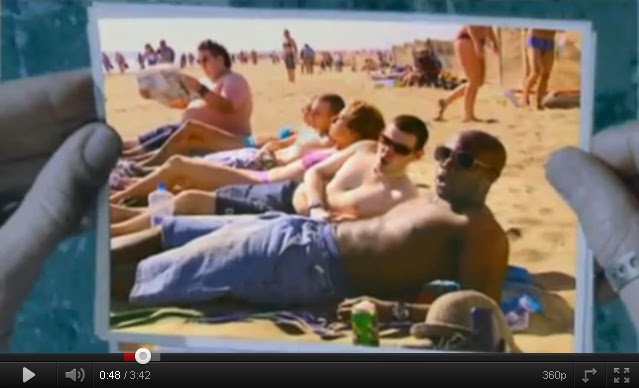
    Goodwin believes that pop videos often rely on repitition, and this could be a particular image appearing when the chorus starts.  E.G: In the video we watched in class 'The Streets - Fit but don't you know it', every time the chorus started a black man with sunglasses and no shirt on appeared, singing the chorus.  

    Chorus of 'The Streets - Fit but don't you know it'
    Adding to that, Goodwin feels that repitition also occurs in 'songs of parts or rhythms of other songs', which is known as intertextuality, allows the target audience to 'know what to expect' in music videos of a certain genre.   Goodwin also believes that repitition creates a sense of familiarity, as plays a big part in the way the song/video is broadcasted, e.g on the radio, on TV, on youtube, on adverts..etc.


    Goodwin distinguishes between three types of videos:• ILLUSTRATION: where the video shows the lyrics in visual form and tells the same story
     •  AMPLIFICATION: when the video introduces new meanings and do not contradict the lyrics
    •  DISJUNCTURE: where the is a small connection between the video and lyrics (contradiction between video and lyrics may occur)

    Below are three different examples of each of the song types:

    Illustration: Beyonce - Best Thing I Never Had

    Amplification: T-Pain ft Chris Brown - Freeze
    Disjuncture: Daft Punk - Around The World

    Many pop videos have motif(s) that are easily recognisable, e.g Michael Jackson used to do the famous 'moonwalk' alot in his videos, and women used to be portrayed as 'objects' that the male desires, which normally occurs in heavy metal and hip hop videos.  Another recognisable motif is Ciara's famous bend, where she bends backwards showing off her flexability and portraying herself as a sex symbol.  Beyonce performed this move on her 'I Am..Tour' as well as at the Glastonbury festival, and female artists such as the two tend to deliberately portray themselves as objects of male desire, however, they look directly at the viewers through the camera and 'break the fourth wall.  Adding to that, female artists such as Beyonce has proved that women can be look good and still be fully dressed, and she proves this in her debut single 'Best Thing I Never Had'   


    Beyonce - Best Thing I Never Had


    Ciara - Like a Boy
     Some music videos vary from the actual song itself, as some of them have nothing to do with the song at all, some may be promoting a film with snippets from the film in the video, and some may just be providing 'visual pleasure' to make the video be repeated several times, and/or to also take the focus away from the song being quite bad.  Many music videos also try and appeal to a wider audience other than those they are targeted at, and this is simply because the more viewers that like them, the more chance their sales/views will increase.

    AS - Technical skills developed

    editing thriller sequence

    When I first came into AS media, I only had a little bit of experience with editing, and that was only with Windows Movie Maker.  Final Cut Pro was very difficult to understand at first, but the more I tried, the better I became.  

     I developed technical skills such as:

    filming thriller sequence
    - editing a variety of different scenes
    - using a variety of transitions between scenes
    - recording footage on a camera from different angles
    - using sound effects from SoundTrack Pro
    - creating sound on SoundTrack Pro
    - placing text onto our sequence with LiveType
    - framing shots properly
    - making sure the scene being edited made sense
    - using appropriate mis-en-scene

    - using appropriate sound for certain scenes

    AS - Digipak

    My digipak wasn't saved on my file but from what I remember, there were more weaknesses than strengths.  I have had previous experience in creating both a cd and magazine cover, however I used a programme called 'Corel PaintShop Pro'.

    A lot of the aspects are similar between the two designing programmes such as the 'magic cut tool', so using Photoshop more or less just refreshed my memory.  However, I do think I will be needing more practice with Photoshop which I will be doing in class and workshops. 


    Although this is more of cd booklet rather than digipak, it's still a good representation of not only a good album, but excellent designs.  This is Chris Brown's latest album 'FAME'.  The colour scheme works well because the colours are vibrant and bright, foreshadowing the good songs on the album.   


    Rather than just having boring colours, text and images, they're all eye catching.  Each page has a different picture of Chris and this again foreshadows not only his different personalities, but the different types of music genres the album contains.  I'd like to have a similar colour scheme for my digipak - I think it could work for all types of genres.

    AS - Lip Sync Tutorial


    Filming and editing a music video is going to be much harder than filming and editing our thriller openings.  The lip syncing has to be perfectly in time with the song lyrics otherwise the video will look bad and unprofessional as mine does.  
    One skill I learnt was the way to select the bit of the song I wanted by marking it and I also learnt about base track editing.  I learnt how to mark each clip in unision with a certain word for it to be in time with the backing track song.  
    It was frustrating when the lipsynching didn't match the song, which made me give up trying.  For my A2 music video, I plan to learn from my mistakes and put in hard work hopefully help me gain many more skills throughout the year to produce high quality work.

    My video is above.

    Reflecting back on the AS year- Lip synch


    Lip Synch
    At the beginning I found it challenging to edit the footage and make it into a music video. The lip synching tutorial was helpful but I felt I had to keep on practising. Eventually I improved and so I was able to do some of the lip synching for our video. I think that a music video needs a lot more editing than a film specially as the lip synching has to be 'spot on' in order to make a good music video. It can be quite frustrating when the lip synching is inaccurate but with practice a very good lip synch can be done! 
    The skills I've learned from the lip synch tutorial:
    • The video has to be edited to the beat of the song. This is so that the video can flow well and not seem 'jumpy'
    • Be very accurate with the lip synch-take a part of the footage and adapt the lyrics to it so that it flows well.
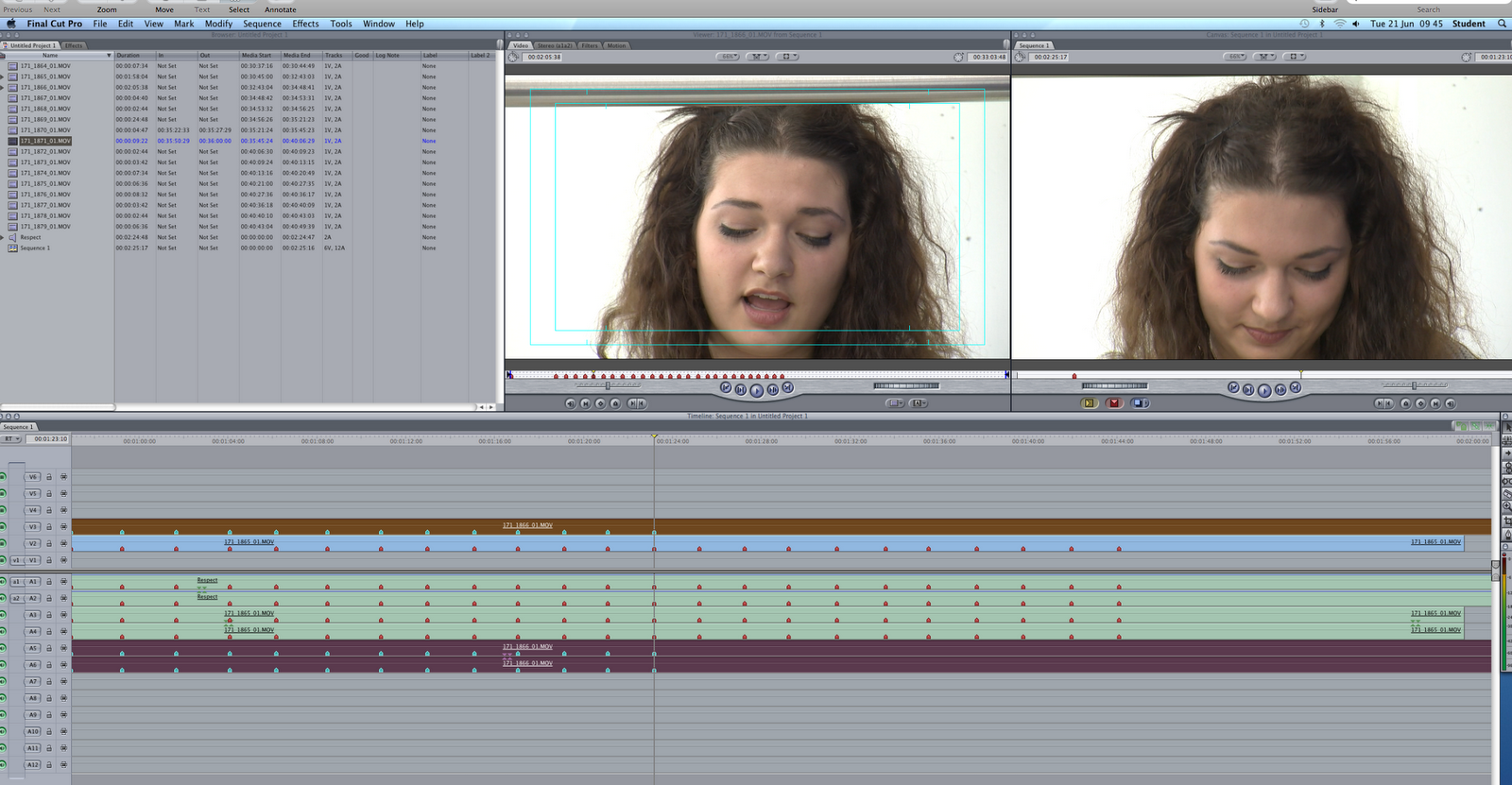
    This is a screen grab of when we began to edit our footage. Through the red dots it can be seen that we have edited our video to the beat.


    Screen grab when making the music video
    This is a screen grab of the lip synch. I believe that our group managed to do this very well. It was hard at first but we gradually improved and so managed to produce a good video for people who have never done any activities related to lip synching.
    lip synch
    This was our final music video, we were happy with it but I think that when we do our final video we now know what to do and not to do.

    Reflecting back on the AS year

    AS Digipak


    At the end of our AS year, the teachers began to give us an insight into the A2 work. We began by attempting to create a digipack using Photoshop. I had certain knowledge on how to use this programme but the small tutorials we had refreshed my memory and so I was able to create a very basic digipack.
    Now looking at it, I can see that it can be improved in many ways:

    • The colour scheme is very dull even though lilac and purple are vivid colours they do not create a great impact on the potential buyer of the digipak. I think that when I begin to do my final digipack I will have in consideration my choice of colours and make sure I use different colours that not only go well together but creates an immediate attraction to the potential buyer.

    • The lack of images or designs make this digipak look very unattractive. Its not so necessary to have a lot of images of the artist in the digipack  but having designs that are relevant to the artist or the name of the album really does make a difference in the appearance of the digipak. I think that when I do my digipak I will have a variety of images or designs in order to make it look attractive to the buyer.

    • The font in this digipak is very basic which is not so much of a negative thing as many digipaks use bold basic font. However, I would like to be more creative when choosing the font for my digipak. I would still like it to be bold but I would like to experiment with different designs.

    • Something positive about this digipak is the big image of the artist on the front cover. I think this is good as it's a way to promote the artist. I would like to do the same when doing my final product.

    RESEARCH - Short list of potential songs

    1. Jessie J - Who's laughing now
    2. Katy B - Lights On
    3. Alexandra Burke - Start Without You
    4. Natasha Bedingfield - Unwritten


    A final decision will be made at the start of Friday's lesson when the rest of the group are present.


    We've narrowed it down to two choices:


    Alexandra Burke - Start Without You

    Jessie J - Who's Laughing Now


    Thursday, 15 September 2011

    AS Digi-pak


    • Our target audience was young teenage girls, so the colour purple fits in well with this to appeal to the young girls.
    • There is one imagine in the cover of the digi-pak which makes our artist the main selling-point on our digi-pak
    • The font is basic and white again not to draw too much attention away from the artist.
    • The image of the artist is a large close up.